v5.14 - latest (2026-11-03)
Welcome to AIVA news for version 5.14. This release brings the AIVA agent right into the app: tell it what you need in plain language, and it records, runs and explains your tests for you. We also made it easier to fix and report table recognition problems, and fixed a number of issues you reported.
Meet the AIVA agent
In v5.9, we introduced the AIVA MCP server, so you could connect your own AI assistant to AIVA. That still works, and now there's also an agent built right into the app, with nothing to set up. Click Ask Agent in the page header, or press Ctrl+K (⌘K on a Mac), and tell it what you need, for example:
- Record a test that logs into my app
- Why did the last run of this test fail?
- Run all tests labelled smoke
- Create a nightly batch for my smoke tests
- How do variables work?
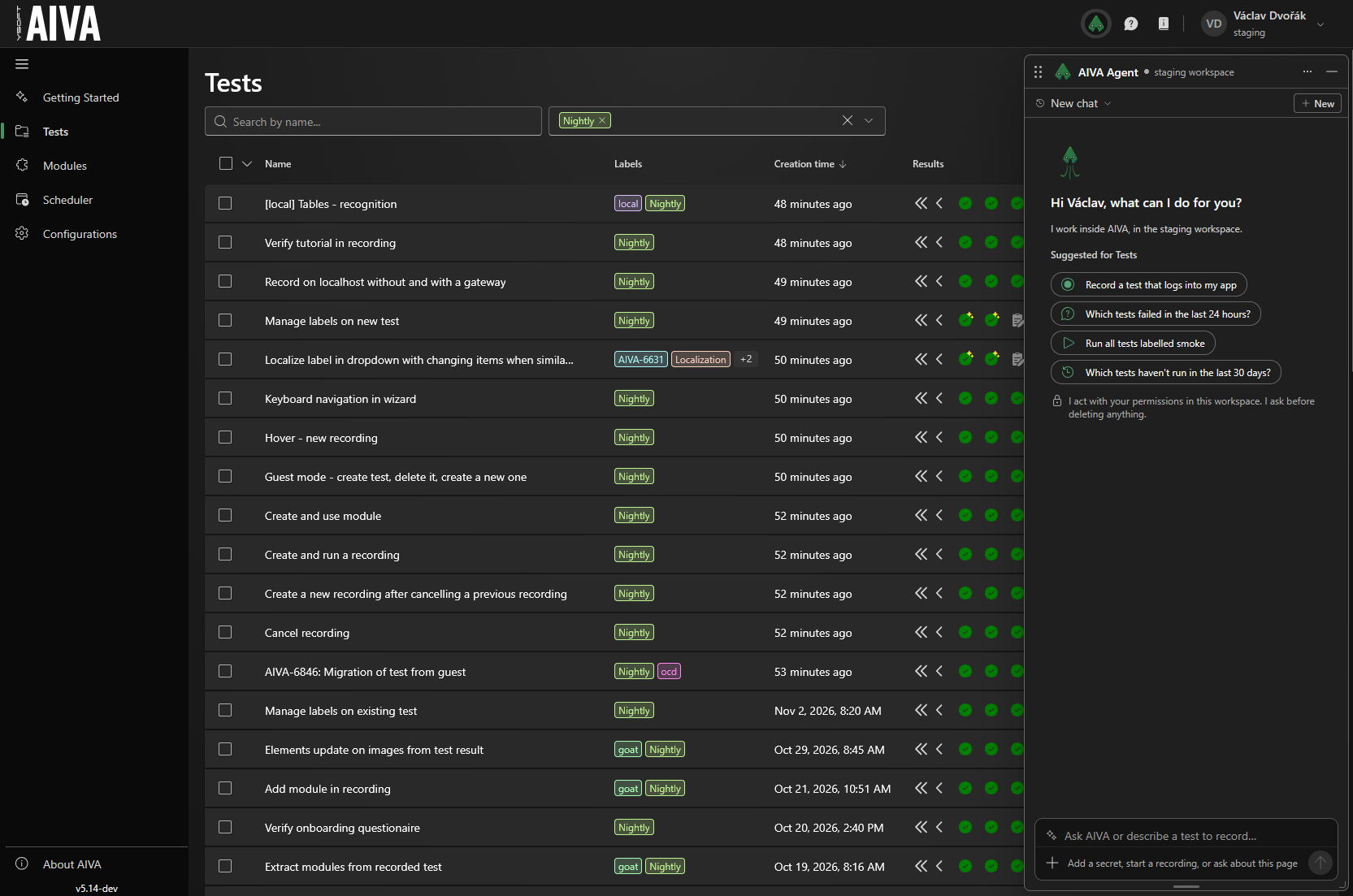
The agent can do everything your AI assistant can do through the MCP server, and it also answers questions about AIVA from this documentation. It works with the page you're looking at: it can open pages, highlight what it's talking about, and click or fill in fields for you. Your tab follows the agent to the tests, runs and batch executions it opens, so you can see what it's doing. It never leaves a page with unsaved changes, and you can turn following off in the agent's settings. To stop the agent while it works on the page, press Esc.
- Safe by design - the agent acts with your permissions, only in the workspace you're in, and it can't switch to another one. Before it deletes or cancels anything, it asks you to confirm right in the chat.
- Secrets stay secret - when a test needs a password or token for your app, add it to the chat as a secret. Only its name goes into the conversation; the value is never shown again, not to you and not to the AI. API keys and gateway tokens are always shown in AIVA itself, never in the chat.
- Suggestions for every page - when you open the agent, it suggests questions that fit the page you're on.
- Your chats - your conversations in a workspace are listed under Chats, and they're kept for 30 days after the last message.
- Weekly allowance - each user has a weekly allowance for the agent. The agent's menu shows how much of it you've used and when it resets.
The agent is available to everyone who has signed up; it isn't available in guest mode. It only works within AIVA: it doesn't browse the web, and it can't send feedback or bug reports for you.
This is the first version of the agent, so we'd love to hear how it works for you.
Fix table recognition problems more easily
When a step on an element in a table fails, the table is usually detected correctly, and only the way AIVA finds the row needs to change. The Not a table button now opens a Turn off table recognition dialog that suggests switching the step to By position first, so AIVA always uses the same row, whatever it contains. If the element really isn't in a table, you can still convert it to a regular element, and optionally report the wrong detection. Reports now include the latest test run of the step, so our team can look into the problem without having to ask you for details.
Minor improvements
- Recording on tablets - test recording is now blocked on phones only. You can record tests on a tablet.
- Weak connection warning - if your internet connection is too weak for the live view to keep up, AIVA now tells you with a banner over the live stream, instead of leaving you with a frozen picture.
- A test always starts on a page - AIVA no longer lets you delete the first Navigate to URL step and save a test without it. A test can also start with a generic module whose first step is a Navigate to URL.
- Back and forward tooltips - during recording, the browser's back and forward buttons tell you when there's no page to go back or forward to.
Notable bugfixes
- Text asserts on small text does not include neighbouring rows in the comparison anymore.
- MCP server: test run results now show variable names and values correctly, batch executions return the test IDs that the other tools accept, and the steps of a stopped run are listed in the right order.
Coming soon
- AIVA agent and MCP server: editing and healing saved tests.
- Browser console logs in test results.