v5.0 (2026-06-24)
Welcome to AIVA news for version 5.0. We bring a major improvement to a core functionality of AIVA.
Hierarchical localization
We have improved the way AIVA finds where to click or where to interact with elements on the web page in general. Now, AIVA takes the hierarchy of the web page into consideration while still only working with visual interpretation of the web page – AIVA avoids analyzing the DOM. We have developed a new generation of our own algorithm, and you can see a sample of the hierarchy localization on AIVA’s Getting Started page. This change makes test execution much more robust and reliable, and is also a prerequisite for further improvements we are planning, such as better options for working with tabular content.
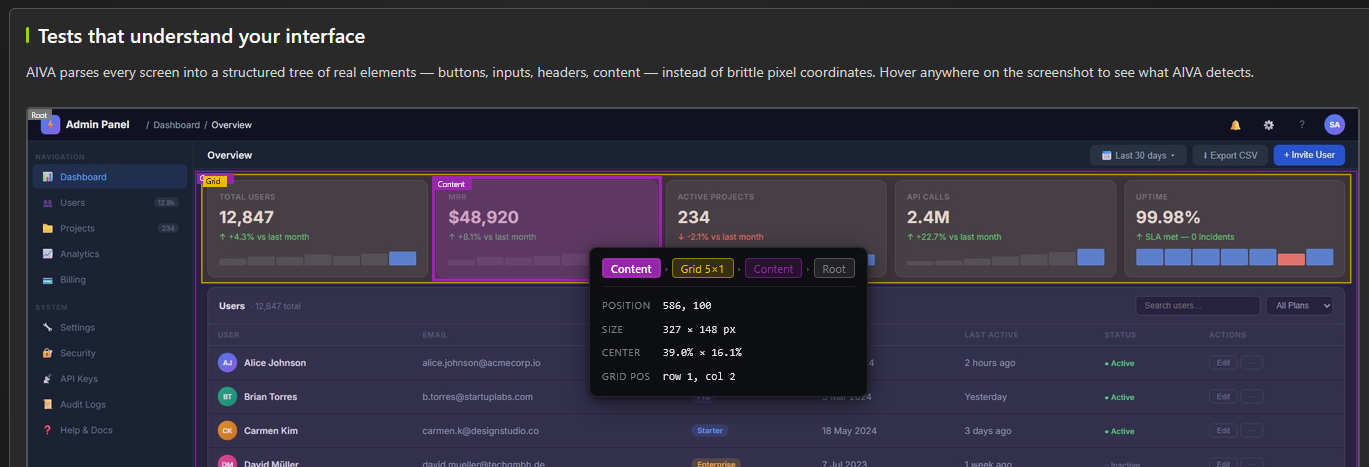
Because this improvement impacts core functionality of AIVA, some problems could arise despite our extensive tests. (We didn’t release until we were satisfied our own battery of tests was green.) We will carefully monitor any issues in how AIVA locates elements, and we suggest you re-run your test suites once after this update. If you find any issue where AIVA does not correctly use a web page element, feel free to report the issue with the built-in report function in AIVA, and please use the healing function as usual.
Migrate test from guest mode to your workspace
Our way of allowing any new user to try out AIVA by creating a test without even signing up had an unfortunate consequence: it could happen – and we’ve actually seen it happen in our user testing sessions – that a user didn’t realize they already have an account in AIVA (or just forgot to log in), created a test, and then logged in to the existing account. In that case, the test they created in the guest mode would be lost, because instead of converting the anonymous, guest workspace to their own (which is what happens when a new user signs up), that guest workspace was just thrown away.
Unsurprisingly, people aren’t happy to find out their test is gone. So, in this release, we improved the behavior in this situation so that the test is migrated from the guest workspace to the user’s own workspace, and nothing is lost. (If the user has access to multiple workspaces, AIVA will ask which workspace to use.)
User testing – GitHub integration
Our recently shipped feature has undergone user testing, where we observed whether and how users were able to integrate AIVA into their CI/CD pipelines with instructions provided. The core of the feature proved to be solid, and all our users were able to follow instructions and complete the integration. We have several points for further improvements that can be split into two categories – documentation tweaks and upgrades (because our users rely heavily on instructions and templates in docs, therefore they must be precise, clear and always up-to-date) and better communication between AIVA and GitHub (because our users don’t want to run a batch and then be kept in the dark with no progress information provided while the batch is running).
Minor quality of life improvements
On the Tests page, there are two new functions: you can now delete multiple selected tests, and you can schedule all tests matching the current label filter. In the next release, we will also add a button to add labels to multiple selected tests at once.

Notable bugfixes
- After you edit a test via re-recording, the following processing of the edited test is now much faster.
- After a test is finished, there is no longer a message that the video recording expired.
- Opening a deleted test no longer looks as if it is loading forever.
Coming soon
- Notifications in scheduler
- User choice of how elements in tables are localized (by content, or by position)
- Minor improvements for users’ first experience with AIVA