v5.12 - latest (2026-10-14)
Welcome to AIVA news for version 5.12. This release brings teardown modules, so your tests can clean up after themselves. Your AI assistant can now also work with module variables when it records tests through the AIVA MCP server.
Teardown modules
Tests often leave something behind: a created user, an uploaded file, an order in a cart. With teardown modules, you can record that clean-up once and attach it to the end of any test, so AIVA returns your app to a known state after every run.
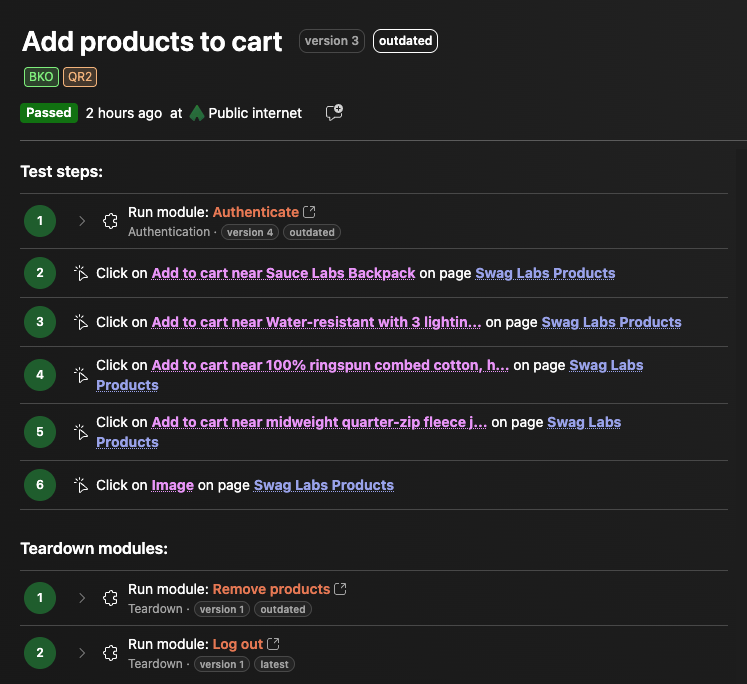
- Extract or reuse - extract the clean-up steps at the end of a test into a teardown module, or add an existing teardown module to a test in Edit mode. If the extracted steps don't start with a URL, AIVA asks you for one.
- As many as you need - a test can have several teardown modules. They always sit at the end of the test and run one after another, in the order you set. You can reorder them at any time.
- Clean-up even after a failure - teardown modules run even if the test itself failed, and AIVA runs all of them, even if one of them fails.
- Variables included - teardown modules support module variables, so you can pass in the same values your test used, for example the email of the user it just created.
- Clear results - if a teardown fails, the test fails too, with the dedicated status Failed in teardown. You can tell right away whether the problem is in your app or in the clean-up.
Like an authentication module, a teardown module must start with a Navigate to URL step. It can't contain any other module.
To learn more, see Clean up after a test with teardown modules.
Module variables through your AI assistant
In v5.10, your AI assistant learned to record tests through the AIVA MCP server, but module steps it added always used the module's default values. Now, when the assistant adds a module, it can set each module variable to the module default, a fixed value, or a test variable. Values you pass for a run, from a batch, the API or your CI, then reach every module variable bound to a test variable, just like for tests recorded in AIVA.
Your assistant can also list a test's variables before running it, and see which values a run actually used. That makes it much easier to find out why a run failed.
Module variables are set while recording. Once the test is saved, your assistant can't change them yet. Editing saved tests through the MCP server is coming in a future release.
To get started, see Connect an AI assistant (MCP).
Minor improvements
- AIVA on your phone - viewing and running sample tests and their results now works comfortably on a phone. Recording tests still needs a desktop, so on mobile, the Create new test button now offers to add a calendar reminder to try AIVA on your desktop, or to explore the sample tests in the meantime.
- Guided tours for tests and results - new in-app guides walk you through the test detail and through passed and failed test results the first time you open them.
- Clearer pricing - AIVA is free for everyone who signs up during early access. The pricing page and the app now say so first; the planned prices are preliminary and shown only on demand.
- Searchable documentation - you can now find what you're looking for quickly using the built-in full-text search.
- Comments on test steps - sometimes, a test is long or complex and it may not be obvious what a step does or why, especially when you return to it after some time. Now, you can add a comment on test steps to help you get your bearings quicker.
Coming soon
- MCP server for AIVA: editing and healing saved tests.
- Browser console logs in test results.