Organize your tests using labels
Labels are an easy way to organize your tests into logical groups. Each label represents a test suite, which can then be executed at once using the batch runner.
Think of them as colourful sticky notes you can stick on any test. Whether you organize your tests by the tested component, test priority, execution period or purpose, it is completely up to you. You can even do all at once.
Adding labels to a test
Labels are defined directly on a test — there's no separate label management screen.
- Open the test you want to label.
- Click the context menu on the top right side and select option Manage labels.
- Type a label name, or pick an existing one from the list, and press Enter.
- Repeat to add as many labels as you need.
A label doesn't need to be created ahead of time — typing a new name creates it as you assign it. The same label can be reused across as many tests as you like, and a single test can carry any number of labels. Add or edit labels any time — no complicated administration required.
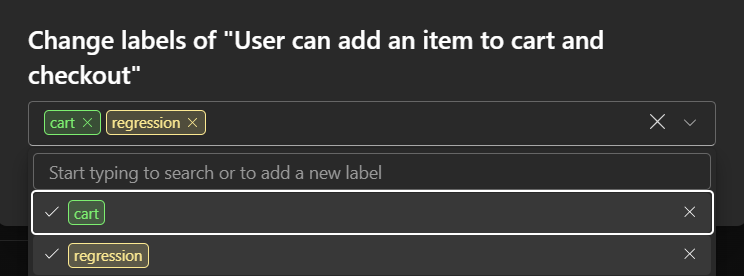
You can also manage labels of multiple tests.
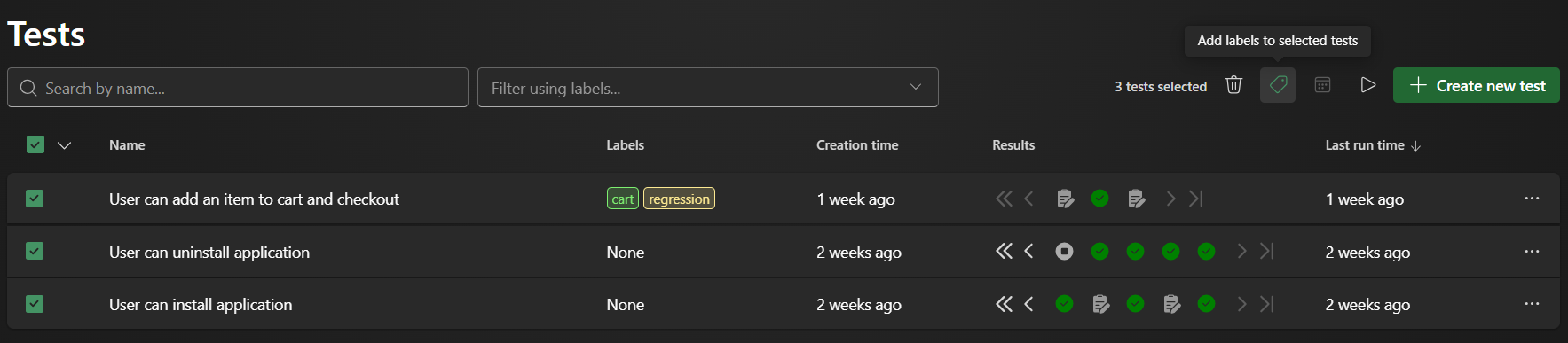
- Start at the Tests page.
- Select multiple tests and click on the Labels icon.
- Type a label name, or pick an existing one from the list, and press Enter.
- Click Add labels to apply labels to all selected tests.
Useful label categories
- By feature or user story:
signup,checkout,user-profile,admin-dashboard,password-reset - By type of test:
smoke,regression,end-to-end,happy-path,edge-case - By environment or configuration:
needs-login,requires-payment-gateway,desktop-only,slow-network - By team or owner:
marketing-site,billing-team,onboarding-flow
Why this pays off immediately
- Run exactly what you want in one click: open the Batch runner, click Run new batch, type
smokein the Labels field → AIVA instantly collects every test that has thesmokelabel and runs them. - Combine labels when needed:
smoke+admin-dashboardorregression+needs-login. Filtering in AIVA works withANDlogic (it only finds tests that have both/all the labels you specified, not just one of them). - Filter the test list: just click any label and you’ll see every test that carries it.
Quick tip for teams
Agree on a tiny set of shared labels early (especially smoke and regression). It takes two
minutes and saves hours later when someone new joins or when you set up automated nightly runs.
Add or edit labels any time — just open a test and click the label area at the top. No complicated administration required.