v4.9 (2026-05-19)
Welcome to AIVA news for version 4.9.
GitLab integration
Last time, we mentioned how it’s now easy to integrate running AIVA test batches with your GitHub CI/CD pipeline. But not everybody uses GitHub, and the next most used system is GitLab – so that’s the one we’ve implemented next, too. You can use the “Run using CI/CD” button in the Batch Runner, and you can also find the procedure documented in the How to… section – see Execute AIVA tests from a CI/CD pipeline.
User profile
We’ve added a User profile section in AIVA, giving you a clearer place to manage your account and preferences. You’ll find it linked under your name in the top right corner. It shows your basic account details, such as your name, email, and login provider, along with your current workspace and subscription tier. You can also review and update your cookie preferences there whenever needed.
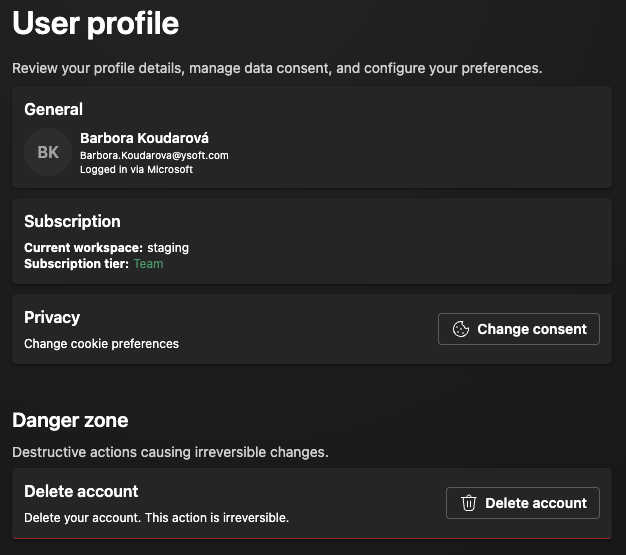
Still in the User profile, you can now delete your user account in AIVA, and remove all data if you are the only user in your workspace. This includes tests, test results and recordings, modules, API keys, and gateways. If you participate in a workspace with other users, the workspace won’t be deleted, but your contributions will be anonymized and your API keys deleted. This feature serves two main purposes: First, it gives you control over your data and fulfills your right to be forgotten. Second, it enables us to test authentication and the whole user experience, including workspace deletion, using AIVA itself. Using AIVA to test itself is a key process for us, showing that AIVA is a standalone tool capable of testing complex interfaces and products.
If you want to know more about AIVA testing itself, see our blog post, The Testing Recursion.
Authentication process improvements
We have reworked how AIVA integrates with our authentication middleware. Previously, you may have encountered various issues, such as having to re-authenticate too often, AIVA showing intermediate loading screens and redirecting to the login screen and back, etc. We believe to have fixed these. You will have to re-authenticate once this version is deployed, but after that the login session should be stable.
Coming soon
- Element localization improvements – prerequisite for having more control over localization of elements in tables and grids
- Test scheduling