v4.2 (2026-02-24)
Welcome to AIVA news for version 4.2.
New feedback button
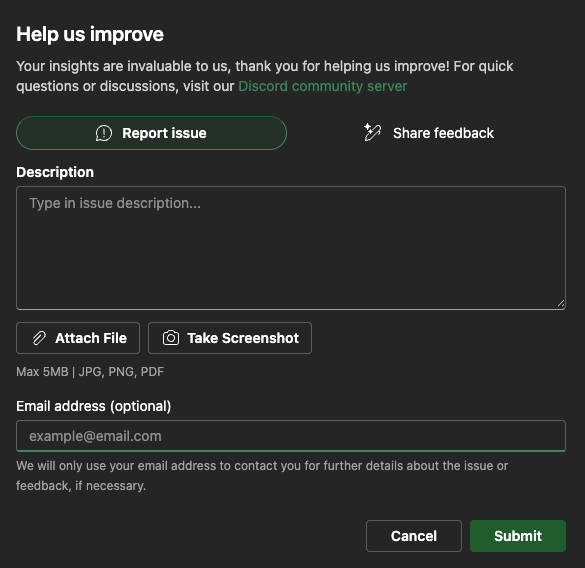
You can now report any issue that you encounter with AIVA, or just submit any type of feedback, directly from AIVA. There’s a new button floating in the bottom right corner (but if it gets in your way, you can dismiss it and later find it in the header).
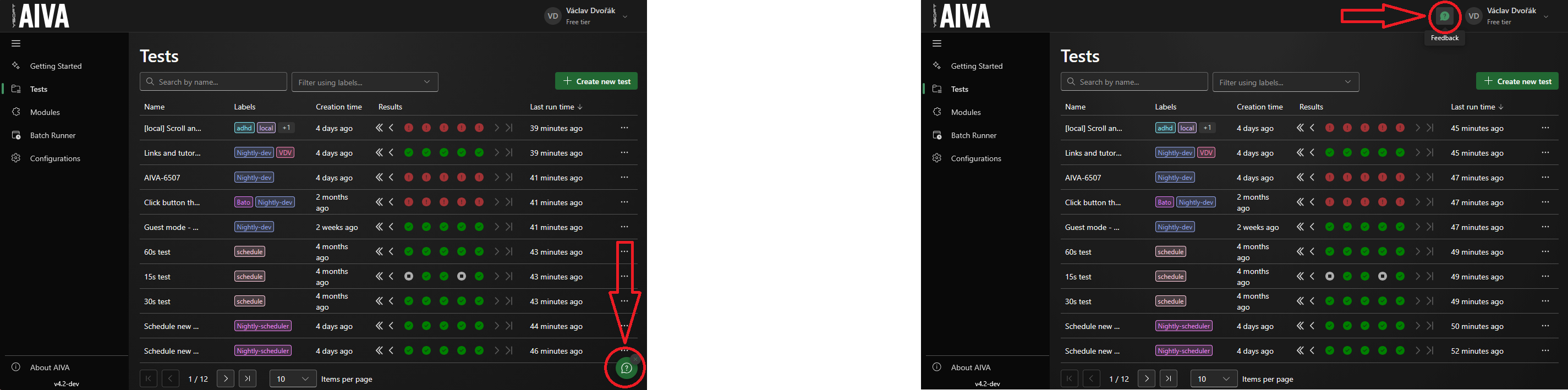
We want to encourage you to either use this new feature or join us on Discord. We thrive on feedback from our users – both positive and negative, because anything relevant helps us improve. Even if, for example, you just had trouble finding a feature that’s already there – even such feedback may help us make AIVA better. (Of course, if you prefer to talk, we’re happy to do that, too.)
Getting back to a recording in progress
Has it ever happened to you that you started a recording, then navigated to a different page in AIVA, and then you couldn’t get back to the recording in progress? Not anymore. When creating a recording, you are notified if you have another recording in progress; you can open it and continue where you left off. With that, you can now start one new recording regardless of how many tests are running in the background. No more waiting for the current test execution to end before you can continue expanding your test suite.
Inviting collaborators
One minor UI change that might catch you off guard: we have moved the “Invite collaborators” button from its prominent position in the top header into the Workspaces tab of Configurations. You can also find it as the “Manage workspaces” menu item in the profile menu (top right corner).
Bugfixes
- Gateways randomly disconnect: Long-term connected Gateways tended to enter an error state for a couple of hours before reconnecting.
- Video playback breaks upon reaching a certain time: There was an issue with video playback in AIVA, causing the playback to stop seemingly randomly.
- Localization improvements: When user records a click a couple of pixels away from the edge of a button, AIVA will always hit the button regardless.
- AIVA not able to work with text fields not supporting pasting of values: It is now possible to select what method should be used for character input – paste (quick) or character by character (simulating real user input).
- User signup optimizations: We removed the unnecessary and annoying redirects and sped up the signup process significantly.
Coming soon
- Visual asserts
- Test recording speed improvements